# Composite Key
A composite key is a single API key bound to several groups at once. Each group gets a prefix, and you pick the group by putting that prefix in front of the model ID.
This saves you from creating a separate key per platform and from switching client configuration back and forth.
**Create one here: [https://tokenflux.dev/keys](https://tokenflux.dev/keys)**
## Create a Composite Key
1. On the [API keys page](https://tokenflux.dev/keys), click `Create Key`.
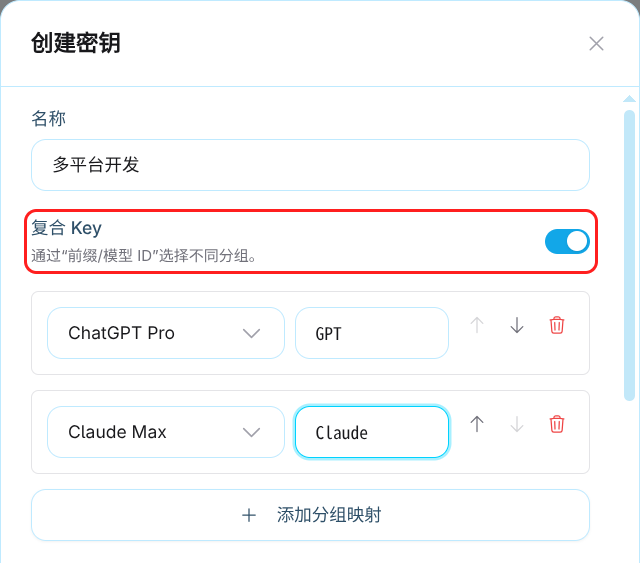
2. Enter a name, then turn on the `Composite key` switch.
3. In the mapping editor that appears, pick a **group** and enter a **prefix** for each row.
4. Click `Add group mapping` for more groups, and use move up/down to reorder them.
5. Save.
The same switch is available when editing an existing key.
For example, you can bind them like this:
| Prefix | Group |
| --- | --- |
| `GPT` | OpenAI group |
| `Claude` | Anthropic group |
### Prefix Rules
- 1-32 characters, using only **letters, numbers, underscores, and hyphens**.
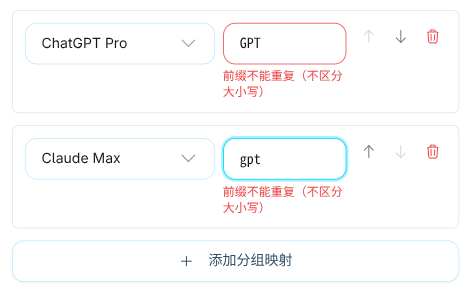
- **Case-insensitive**: `GPT` and `gpt` count as the same prefix and cannot both be used.
- A group can only be added once per key.
- Each composite key supports up to **20** group mappings. The `Add group mapping` button is disabled once you reach the limit.
Invalid prefixes are flagged inline under the field, for example "Use 1-32 letters, numbers, underscores, or hyphens" or "Prefixes must be unique, ignoring case".
## Making Requests
Write the model ID as `prefix/model ID`:
```json
{
"model": "GPT/gpt-5",
"messages": [{ "role": "user", "content": "Hello" }]
}
```
With the bindings above, the two groups are called like this:
- `GPT/gpt-5` - routed to the OpenAI group
- `Claude/claude-sonnet-4` - routed to the Anthropic group
::: warning Only the first slash is used
If the model ID itself contains slashes, only the **first** slash separates the prefix. In `GPT/vendor/model` the prefix is `GPT` and the actual model ID is `vendor/model`.
:::
The native Gemini endpoint takes the prefix in the model path:
```text
POST /v1beta/models/Gemini/gemini-2.5-pro:generateContent
```
## Model Lists
Model list endpoints such as `/v1/models` aggregate the available models from every mapped group, in mapping order, and add the matching prefix to each model ID. Clients that fetch the model list can select a prefixed model directly instead of assembling it by hand.
## View Request Examples
Click `Use` on a composite key in the key list. The dialog lists a request example for every prefix, ready to copy.
## Unsupported Endpoints
Composite keys **do not support WebSocket or Realtime endpoints**, including `/v1/live`, Codex Realtime, Responses WebSocket, and Live sideband. Those connections can switch models within a single session, so the prefix cannot determine the group, and requests return `COMPOSITE_KEY_ENDPOINT_UNSUPPORTED`.
**Keep using a regular API key for those cases.**
Regular API requests are all supported, including chat, image generation and editing, batch image submission, and the model-less usage, billing, and task query endpoints.
## Common Errors
Prefix problems return HTTP 400, using the error structure of whichever endpoint you called (OpenAI, Anthropic, or Google):
| Error code | Meaning |
| --- | --- |
| `COMPOSITE_KEY_MODEL_PREFIX_REQUIRED` | The model ID has no prefix |
| `COMPOSITE_KEY_PREFIX_NOT_FOUND` | The prefix is not mapped on this key |
| `COMPOSITE_KEY_PREFIX_INVALID` | The prefix format is invalid |
| `COMPOSITE_KEY_ENDPOINT_UNSUPPORTED` | The endpoint does not support composite keys |
## Notes
- In the `Group` column of the key list, a composite key shows a set of `prefix / group name` chips. Clicking it opens the edit dialog directly - you **cannot** swap groups inline the way you can with a regular key.
- When converting a composite key back to a regular key, you must pick a group again before saving.
- If a save **adds** a data sharing group, a data sharing notice appears with a 10-second countdown before you can confirm. Only one notice is shown per save, and groups already mapped are not prompted again.
- Billing, multipliers, rate limits, quotas, and expiry behave exactly as they do for regular keys, based on whichever group the request lands on.
## Related Links
- [Create API Key](https://docs.tokenflux.dev/en/docs/tokenflux/create-apikey.md) - creating a regular key
- [Billing](https://docs.tokenflux.dev/en/docs/tokenflux/billing.md) - how group multipliers are calculated
- [Model marketplace](https://tokenflux.dev/models) - available models per group