
Composite Key
A composite key is a single API key bound to several groups at once. Each group gets a prefix, and you pick the group by putting that prefix in front of the model ID.
This saves you from creating a separate key per platform and from switching client configuration back and forth.
Create one here: https://tokenflux.dev/keys
Create a Composite Key
- On the API keys page, click
Create Key. - Enter a name, then turn on the
Composite keyswitch. - In the mapping editor that appears, pick a group and enter a prefix for each row.
- Click
Add group mappingfor more groups, and use move up/down to reorder them. - Save.
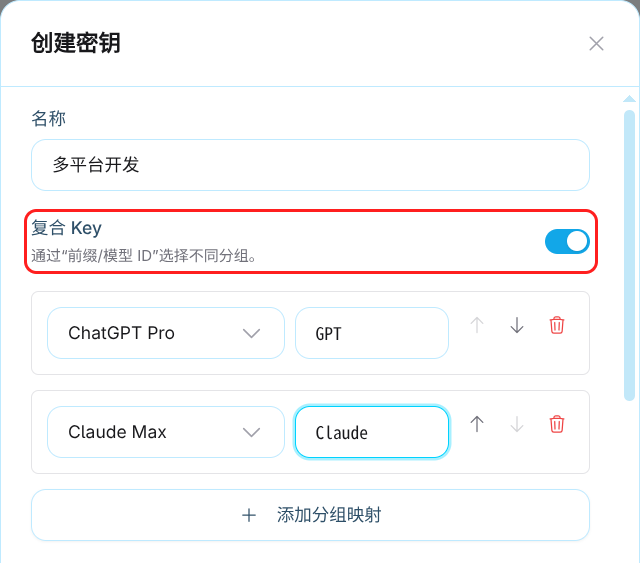
The same switch is available when editing an existing key.
For example, you can bind them like this:
| Prefix | Group |
|---|---|
GPT | OpenAI group |
Claude | Anthropic group |
Prefix Rules
- 1-32 characters, using only letters, numbers, underscores, and hyphens.
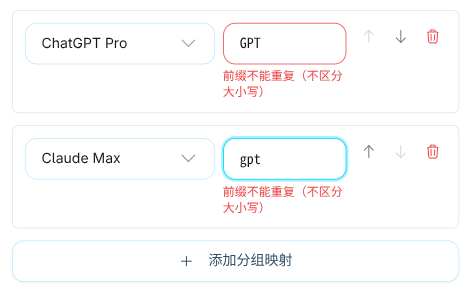
- Case-insensitive:
GPTandgptcount as the same prefix and cannot both be used. - A group can only be added once per key.
- Each composite key supports up to 20 group mappings. The
Add group mappingbutton is disabled once you reach the limit.
Invalid prefixes are flagged inline under the field, for example "Use 1-32 letters, numbers, underscores, or hyphens" or "Prefixes must be unique, ignoring case".
Making Requests
Write the model ID as prefix/model ID:
{
  "model": "GPT/gpt-6-astra",
  "messages": [{ "role": "user", "content": "Hello" }]
}
With the bindings above, the two groups are called like this:
GPT/gpt-6-astra- routed to the OpenAI groupClaude/claude-sonnet-5-5- routed to the Anthropic group
Only the first slash is used
If the model ID itself contains slashes, only the first slash separates the prefix. In GPT/vendor/model the prefix is GPT and the actual model ID is vendor/model.
The native Gemini endpoint takes the prefix in the model path:
POST /v1beta/models/Gemini/gemini-2.5-pro:generateContentModel Lists
Model list endpoints such as /v1/models aggregate the available models from every mapped group, in mapping order, and add the matching prefix to each model ID. Clients that fetch the model list can select a prefixed model directly instead of assembling it by hand.
View Request Examples
Click Use on a composite key in the key list. The dialog lists a request example for every prefix, ready to copy.
Unsupported Endpoints
Composite keys do not support WebSocket or Realtime endpoints, including /v1/live, Codex Realtime, Responses WebSocket, and Live sideband. Those connections can switch models within a single session, so the prefix cannot determine the group, and requests return COMPOSITE_KEY_ENDPOINT_UNSUPPORTED.
Keep using a regular API key for those cases.
Regular API requests are all supported, including chat, image generation and editing, batch image submission, and the model-less usage, billing, and task query endpoints.
Common Errors
Prefix problems return HTTP 400, using the error structure of whichever endpoint you called (OpenAI, Anthropic, or Google):
| Error code | Meaning |
|---|---|
COMPOSITE_KEY_MODEL_PREFIX_REQUIRED | The model ID has no prefix |
COMPOSITE_KEY_PREFIX_NOT_FOUND | The prefix is not mapped on this key |
COMPOSITE_KEY_PREFIX_INVALID | The prefix format is invalid |
COMPOSITE_KEY_ENDPOINT_UNSUPPORTED | The endpoint does not support composite keys |
Notes
- In the
Groupcolumn of the key list, a composite key shows a set ofprefix / group namechips. Clicking it opens the edit dialog directly - you cannot swap groups inline the way you can with a regular key. - When converting a composite key back to a regular key, you must pick a group again before saving.
- Billing, multipliers, rate limits, quotas, and expiry behave exactly as they do for regular keys, based on whichever group the request lands on.
Related Links
- Create API Key - creating a regular key
- Billing - how group multipliers are calculated
- Model marketplace - available models per group