
Create API Key
You need to create an API key before using TokenFlux.
Go directly to the creation page: https://tokenflux.dev/keys
Steps
- Sign in and open the API keys page.
- Click the
Create Keybutton in the upper-right corner. - Enter a recognizable name, such as
deepseek-harnessorcc-switch. - Check the model, protocol, and client restrictions under Choosing a Group, then pick a group. The dropdown shows each group's multiplier and current capacity.
- Create the key, copy the generated value, and store it safely (you can also view or copy it later in the key list).
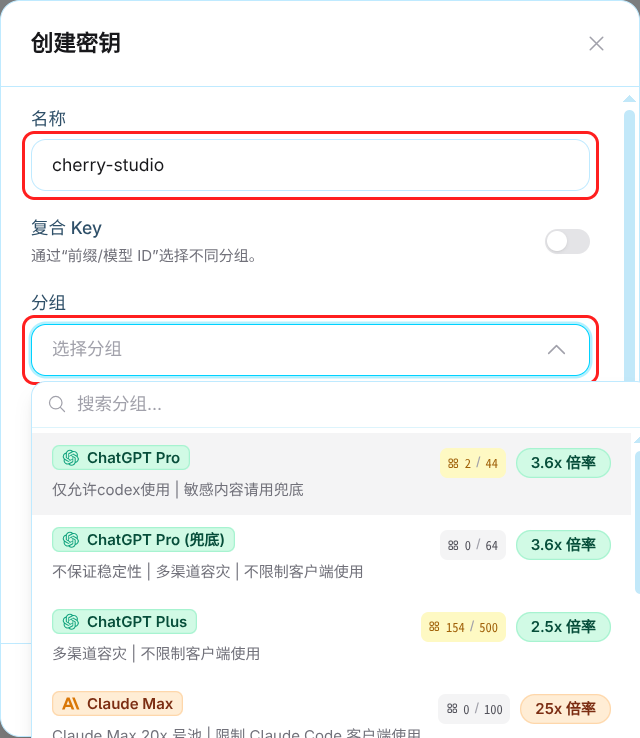
Choosing a Group
Find the target model in the model marketplace and check:
| Check | Selection criteria |
|---|---|
| Model | The group includes the full model ID you intend to call |
| Protocol | The group supports the client's API; check the client guide and API Endpoints, not just the model vendor |
| Client restrictions | The group description allows your client; client-restricted groups are not suitable for other tools |
| Price and capacity | Check the group's final unit prices, multiplier, and current capacity; see Billing for calculations |
An ordinary key belongs to one group. For several groups, create separate keys or use a composite key and select models with prefixes. Subscription plan names are not group names.
Key Security
Create separate keys for different clients so you can identify and disable them individually. Do not commit keys to a repository, embed them in a public web frontend, or share them. If a key leaks, disable it immediately on the keys page, create a replacement, and update the client configuration.
Next Steps
- API Endpoints - the API address to enter in your client
- Quickstart - choose an integration path based on your workflow
- CC-Switch Guide - configuration manager for Claude Code and Codex
- DeepSeek Harness Guide - configure a custom model API